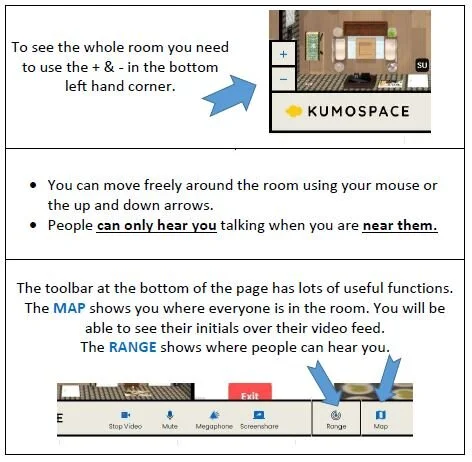
HOw to Find our Virtual Staffroom…
Hey Everyone,
We thought it might be a nice idea to host virtual break-time twice a week. Instead of a zoom we’re going to try Kumospace, as it is a little less formal, and easier for socializing. The aim is to create a virtual place and time for a catch-up. Thanks to Gary for the recommendation…
All the details are below…
Days: Tuesday’s and Thursday’s
Time: 10am-11am (I will open the staffroom between these times. You can pop in whenever suits or for as long as you like)
Where: www.kumospace.com/stultansstaffroom
How:
The platform works best on a laptop or PC. It does work on a phone but it uses a lot of battery and is can be difficult to navigate on a phone.
Click on the link https://www.kumospace.com/stultansstaffroom
It will bring you to a site where you need to set up an account to log-in.
When you are logged in you will be prompted to JOIN St Ultan’s Staffroom.
This will direct you to a page that looks like this….
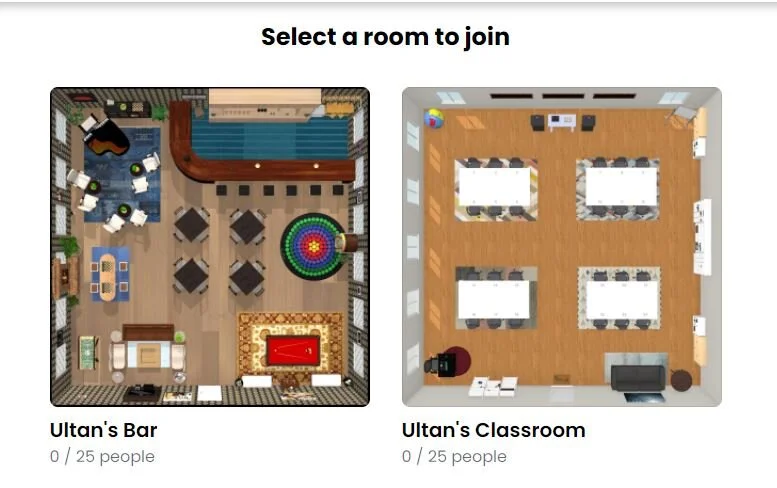
5. There are two rooms for you to choose from, or arrange to meet people in… To start with we can use the Bar but when you are familiar with it you can use either room.